OptiSigns Compatibility with Stretched Bar LCD Displays: A Practical Integration Guide for Digital Signage Projects
Introduction
When a digital signage project requires an ultra-wide display, selecting the LCD panel is only one part of the engineering work. The playback hardware, content management software, output resolution, installation space, and content layout must also work together.
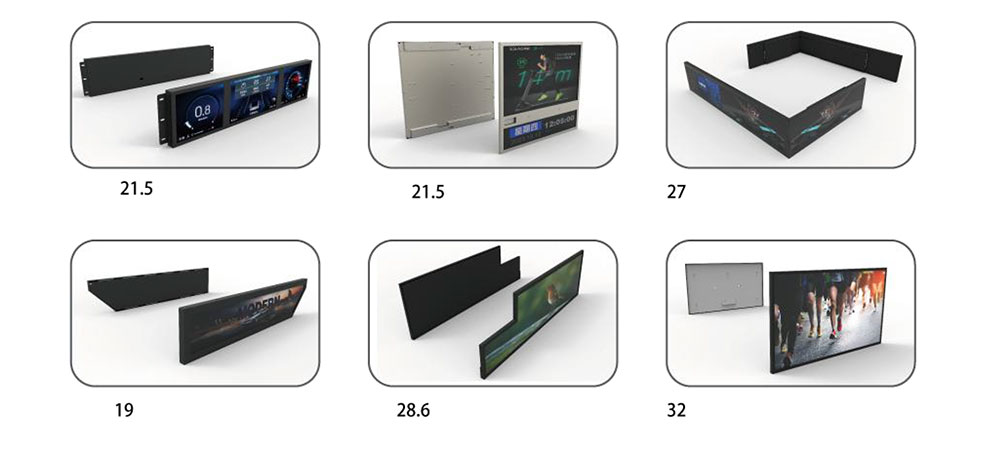
This becomes particularly important when a project uses a stretched bar LCD display rather than a conventional 16:9 monitor. The display may have to fit into a narrow retail fixture, a restaurant menu board, a product information strip, or a custom equipment enclosure. In these applications, the available screen area is determined by the product design, not by the standard dimensions of a television.
For businesses already using a digital signage platform, replacing the existing content management workflow is not always desirable. They may prefer to retain their current software for uploading media, preparing playlists, and managing deployed screens while selecting display hardware that meets the physical requirements of the installation.
HITULCD has evaluated an integration configuration involving OptiSigns digital signage software and a stretched bar LCD display. The evaluation included preparing content through the software interface and displaying promotional material on the physical screen.
This article examines the technical considerations behind this type of integration, the checks that matter when using OptiSigns with an ultra-wide LCD, and the information OEMs, distributors, and digital signage integrators should establish before moving from a sample test to production deployment.
1. Why OptiSigns Is Relevant to Stretched LCD Projects
OptiSigns is a digital signage content management platform that allows users to prepare and distribute content to connected screens. Its software ecosystem includes player applications for supported Android devices and several other operating systems. Content can be managed through its web-based platform, with media and playlists assigned to individual screens or groups of screens.
Official product documentation describes support for Android devices, but it also advises customers to test specific hardware configurations because device quality, software versions, and system updates can affect operation.
This distinction matters for display manufacturers and project integrators.
An application being available for Android does not automatically establish that every Android-based embedded board will behave identically. Processor architecture, firmware, display output configuration, system permissions, startup behavior, and application compatibility all need to be considered.
For a stretched bar LCD project, the practical question is therefore not simply whether OptiSigns can run on Android. It is whether the selected playback platform can run the intended player application and deliver the required image to the display in the correct format.
2. The Integration Configuration Evaluated by HITULCD
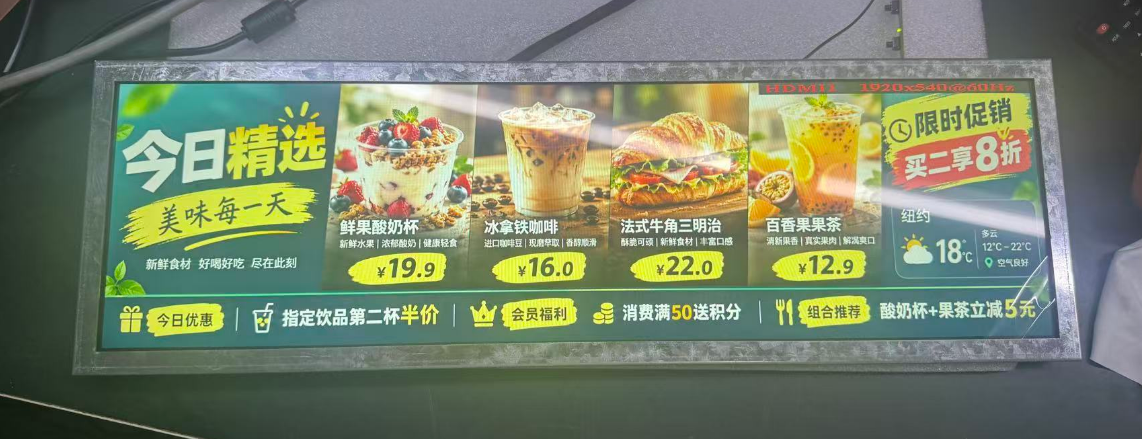
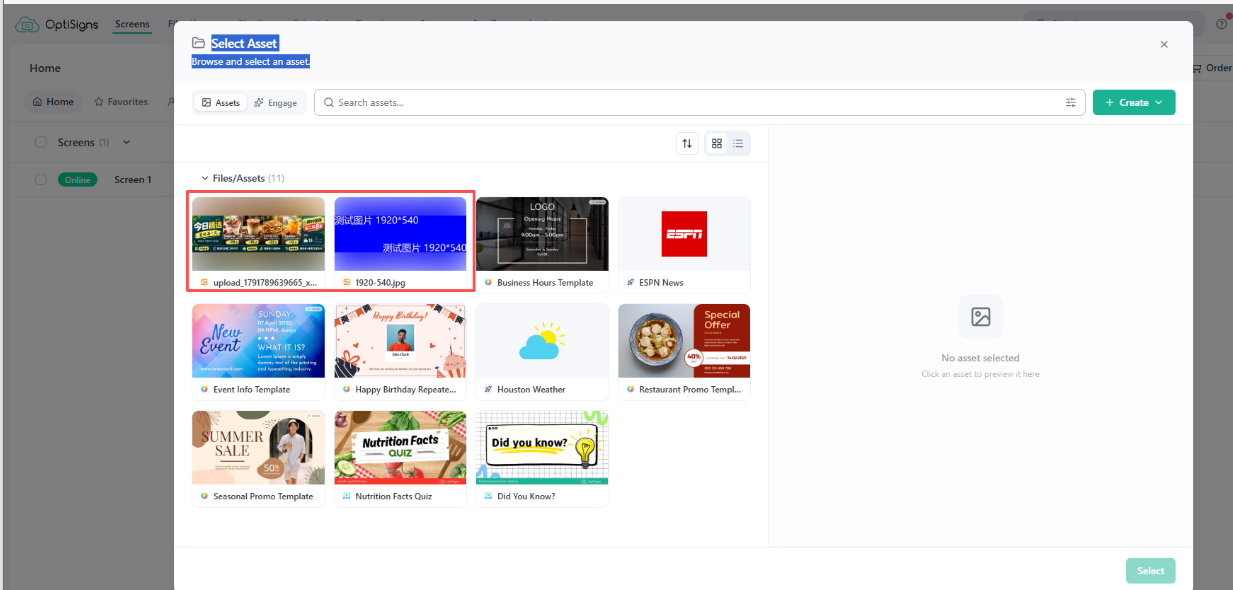
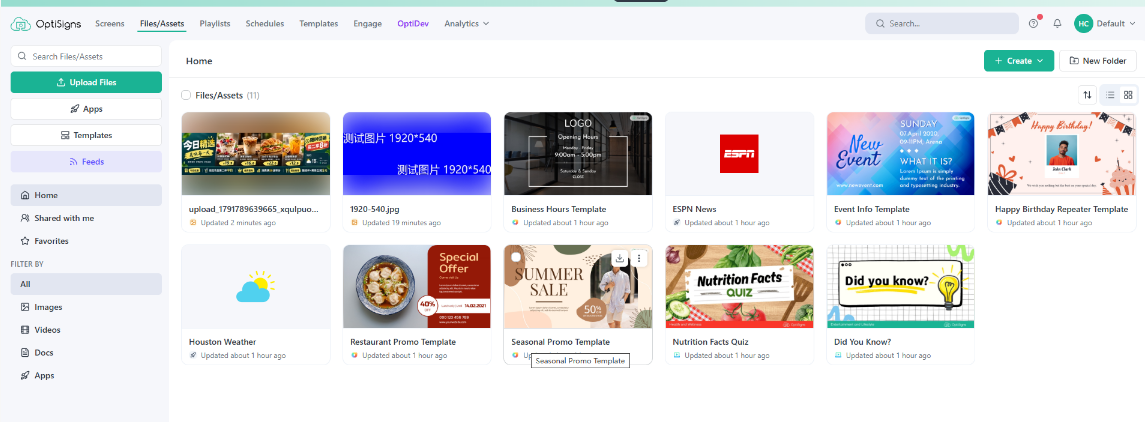
The test material supplied by HITULCD shows a stretched LCD displaying promotional menu content, together with a software management interface containing media thumbnails.
These are useful elements of an integration evaluation because they relate the content preparation workflow to the final physical display. They should, however, be interpreted within the scope of the available test evidence.
The observed configuration includes the following elements:
Digital signage software: OptiSigns, used to prepare and manage display content.
Display hardware: A HITULCD stretched bar LCD display showing promotional menu material.
Content preparation: Media assets organized through the software's management interface.
Physical output: Prepared content displayed on the stretched LCD screen.
The available OptiSigns screenshots do not independently establish the exact processor, operating system, output resolution, or firmware version used in this particular test. Those details should be recorded from the actual test unit before they are included in a formal compatibility report.
The distinction between the LCD panel and the playback system is equally important. The panel produces the image, while the player and its software determine how the content is rendered and delivered. If the image is cropped or distorted, the source of the problem may be the creative layout, player scaling, output mode, or display configuration.
Identifying the responsible component before changing the hardware helps prevent unnecessary redesign work.
3. Content Management Is Only the First Step
A digital signage platform can simplify the preparation and distribution of content, but the management workflow and the physical display must be evaluated separately.
For a typical project, the content process involves several stages.
Preparing the media
The operator uploads or selects the images, videos, graphics, and other content required for the installation. For a restaurant menu, this may include product photographs, item names, prices, promotional messages, and category headings.
For retail applications, the material may instead contain product information, campaign artwork, pricing, or brand graphics.
The content itself should be designed for the target display. Reusing a standard landscape creative without modification can produce an unbalanced layout on an ultra-wide screen.
Organizing content for playback
A playlist or equivalent publishing workflow determines which material appears on the display and in what sequence. The precise scheduling and publishing features available depend on the software plan and configuration.
For a single display, the workflow may be relatively straightforward. A deployment involving several screens requires additional attention to screen assignment, content ownership, update procedures, and the possibility of publishing material to the wrong device.
Checking the preview
A preview allows the operator to inspect the intended layout before publication. It can help identify incorrect image placement, missing text, overlapping content, and obvious design problems.
However, a preview does not necessarily reproduce the exact behavior of the physical playback environment. The final result should always be checked on the target display at its intended output resolution.
Verifying the physical result
Once the content is displayed, the engineer should compare it with the intended design.
The relevant questions are straightforward:
Are all important elements visible?
Are text and prices readable at the expected viewing distance?
Are product images displayed at the correct proportions?
Does the content use the available screen area effectively?
Are any elements cut off at the edges?
Does the display orientation match the installation?
The HITULCD test images provide a practical starting point for this type of evaluation. A formal acceptance test should record the hardware configuration, resolution, software version, content used, and results observed.
4. The Engineering Challenge of Ultra-Wide Content
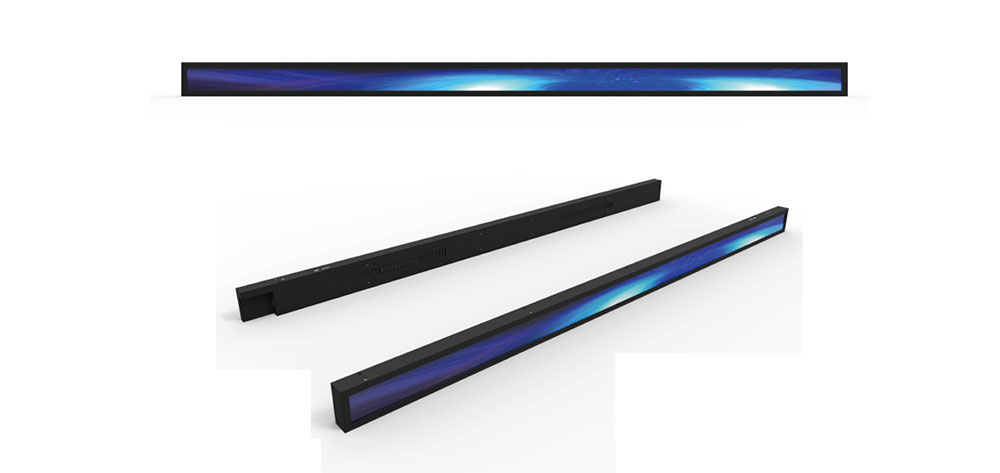
The most important difference between a stretched bar LCD and a standard widescreen display is the aspect ratio.
A conventional 16:9 creative is designed around a particular relationship between width and height. A stretched display may use a much wider format, so the same material can look crowded, undersized, or poorly balanced when transferred without adjustment.
There is no single scaling setting that solves every situation. The correct approach depends on the panel's native resolution, the original content, and the information that must remain visible.
Confirm the native resolution
Before preparing a final template, obtain the native resolution of the selected LCD panel and confirm the output modes supported by the playback hardware.
The content canvas, player output, and panel configuration should be aligned wherever the system allows.
If the creative is prepared at a different resolution, the player may need to scale it. Depending on the scaling method, this can introduce unused space, distortion, or cropping.
The physical size of a panel alone is not enough to determine the correct content resolution. Two displays with similar dimensions may have different native pixel counts and aspect ratios.
Design for the available width
A wide canvas creates opportunities to arrange information horizontally, but additional width does not automatically make content easier to read.
For a restaurant menu, the screen can be divided into product groups, prices, promotional images, and supporting information. The layout should maintain a clear reading order rather than spreading unrelated elements across the full width.
For retail signage, product names and promotional messages should remain legible from the intended viewing position. Decorative backgrounds should not compete with essential information.
For an equipment-integrated display, critical status information may need to occupy a defined area that remains visible regardless of other content.
These decisions should be made when the template is designed, rather than corrected after the display has been installed.
Decide how images should scale
When a source image and the target screen have different aspect ratios, the playback configuration must handle the mismatch.
Filling the entire display can distort an image if its proportions are not preserved. Maintaining the original proportions can leave unused areas. Cropping can remove information near the edges.
For promotional backgrounds, a carefully selected crop may be acceptable. For product photographs, prices, labels, and instructional material, losing part of the image may make the content unusable.
The preferred behavior should therefore be defined for each content type and checked on the actual display.
Check text at the intended viewing distance
A layout that looks readable on a computer monitor may be difficult to read when displayed on a screen mounted above a counter or shelf.
The engineer should review the physical pixel dimensions, font size, contrast, viewing angle, and expected distance from the viewer. Small text should not be used merely to fit more information onto the canvas.
For a commercial menu board, the principal product names, prices, and promotional messages should remain easy to identify without requiring the viewer to stand directly in front of the screen.
5. Playback Hardware and Software Compatibility
OptiSigns supports a range of playback platforms, including Android devices. Its official documentation also notes that hardware differences and system updates can affect behavior, which is why testing the intended device is important.
For embedded display projects, the relevant hardware configuration should be documented in sufficient detail to reproduce the test.
This normally includes:
Processor or playback board model.
Operating system and firmware version.
OptiSigns player version and installation method.
Available memory and storage.
Video output interface and supported output modes.
Panel model and native resolution.
Network connection and content delivery method.
Startup and recovery behavior required by the application.
The purpose of recording these details is not administrative. It makes the result repeatable.
If a later production batch uses a different board revision or firmware image, the original test result may not fully describe the new configuration. A controlled change should trigger a review of the affected functions.
Where a custom Android board is used, the team should also verify application installation, startup permissions, display output, and recovery after a restart. These requirements should be tested on the actual hardware rather than inferred from the operating system name alone.
6. Network Behavior and Content Updates
Cloud-managed digital signage introduces requirements beyond image output.
The player may need an internet connection for initial setup, account pairing, content downloads, and remote management. The exact requirements depend on the software configuration and the functions being used.
For a project intended to operate in a commercial environment, the engineer should establish how content is delivered and what happens when connectivity is interrupted.
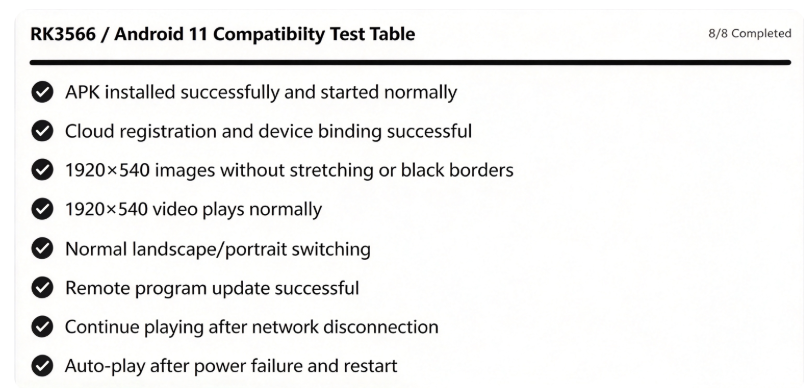
A useful test plan includes:
Initial setup: Confirm that the device can be enrolled and associated with the correct screen or account.
Content publishing: Upload representative media and verify that the intended content reaches the physical display.
Update verification: Change an existing asset or playlist and confirm that the new content appears as expected.
Network interruption: If intermittent connectivity is possible, test the player's behavior during disconnection and reconnection.
Restart recovery: Restart the device and verify that the required player application returns to the intended operating state.
Access management: Confirm that only authorized personnel can change content or assign material to the screen.
Not every installation requires the same level of testing. A demonstration unit used for occasional promotional content has different operational requirements from a display expected to run throughout a retail business day.
The acceptance criteria should reflect the actual application.
7. Applications for Stretched Bar LCD Displays
The combination of a content management platform and an ultra-wide LCD can be relevant to several types of commercial installation. The suitability of each application depends on the selected panel, the playback configuration, and the content requirements.
Restaurant and quick-service menu boards
A long horizontal screen can fit above a service counter where vertical space is limited.
The content can be arranged into menu categories, product images, prices, and promotional sections. For multi-location operators, a centralized publishing workflow may simplify routine menu changes, provided the required screen management and scheduling features are available in the chosen software configuration.
The main engineering priorities are text legibility, correct price presentation, image proportions, and the ability to update the content without disrupting normal operation.
Retail shelf and promotional displays
Stretched LCDs can be integrated into narrow retail fixtures or placed above product displays.
The format is suitable for horizontal promotional messages, product information, and campaign graphics where a conventional monitor would not fit the available space.
For retail rollouts, the project team should pay particular attention to the mounting arrangement, viewing distance, content template, and process for updating multiple screens.
Commercial information displays
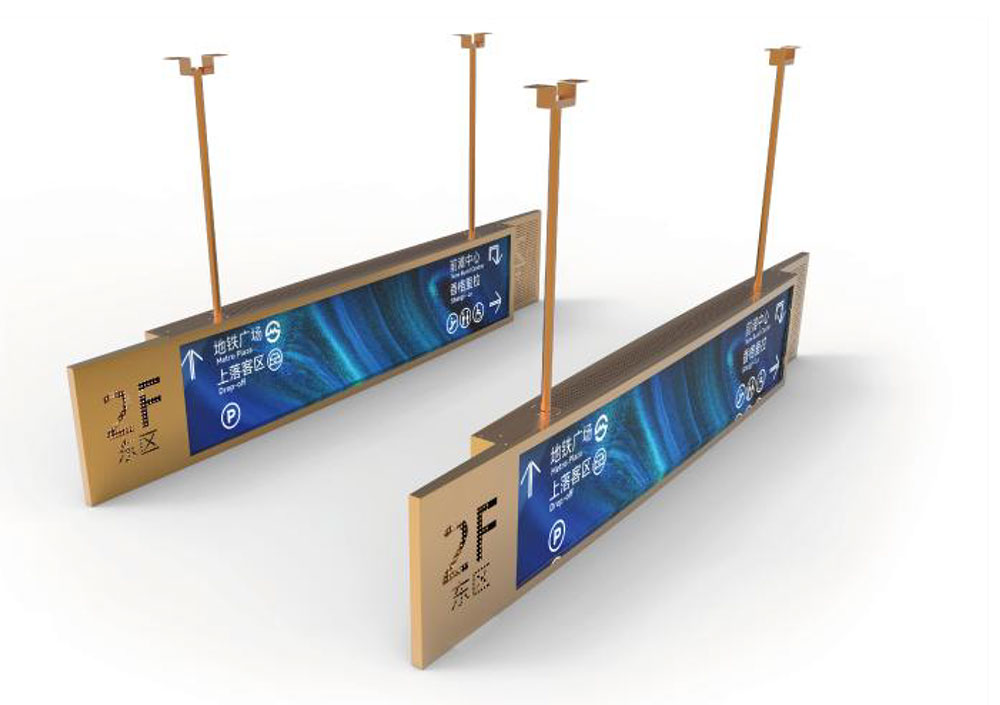
An ultra-wide format can be used for wayfinding, short announcements, promotional messages, and other information that benefits from a narrow horizontal layout.
The final content should be designed around the physical installation. A screen mounted high above a corridor, for example, may require a different font size and contrast strategy from a display positioned at eye level.
OEM equipment integration
Equipment manufacturers may need a long, narrow display that follows the geometry of a machine, service counter, or custom enclosure.
In these cases, the LCD must be considered alongside the enclosure, mounting structure, power supply, controller, operating temperature, and maintenance requirements.
If a third-party digital signage application is part of the solution, its role should be defined clearly. A signage CMS may be suitable for promotional or informational content, but an application that requires real-time machine control or safety-critical status indication needs a different level of functional assessment.
The software should not be assumed to replace a dedicated control interface simply because it can display information.
8. What OEMs and Integrators Should Confirm Before Ordering
A sample test can help determine whether an integration is technically promising. Before a production order, the buyer and supplier should agree on the actual acceptance requirements.
The following questions are useful during the technical review.
Display requirements
What are the panel dimensions, native resolution, aspect ratio, brightness requirement, viewing angle, and mounting orientation? Will the display be used indoors, near a window, or in a high-ambient-light environment?
Playback configuration
Which board or media player will be supplied? Which operating system and firmware version will be used? Is the required software version compatible with that specific configuration?
Content requirements
Will the system display static images, video, text, web-based content, or a combination? Are there strict requirements for scaling, cropping, text size, or full-screen playback?
Deployment requirements
How will screens be registered, assigned, and updated? Does the project require scheduled content, remote management, offline operation, or recovery after power interruption?
Environmental and mechanical conditions
What are the expected operating temperatures, available ventilation, power conditions, cable routing requirements, and mounting constraints?
Acceptance testing
Which functions must be demonstrated before shipment? Should the test cover initial startup, content publishing, physical output, restart recovery, network interruption, and extended operation?
A written acceptance checklist is more useful than a general statement that a display is compatible. It defines what was tested, under which conditions, and what the buyer can reasonably expect from the delivered configuration.
9. HITULCD's Approach to Display Integration
For a stretched LCD project, successful integration depends on understanding the complete display configuration rather than selecting a panel by size alone.
The content management platform determines how material is prepared and distributed. The playback hardware runs the application and generates the output. The LCD panel determines the native image dimensions and physical viewing characteristics. The enclosure and installation environment introduce additional mechanical and thermal requirements.
HITULCD's OptiSigns evaluation provides a starting point for assessing the relationship between software-managed content and a stretched bar LCD display. The available test material shows promotional content on the physical screen and a content management interface used in the preparation process.
For projects requiring a production-ready solution, the next step is to document the precise hardware and software versions, confirm the panel's native resolution, and complete the tests required by the intended application.
HITULCD works with OEMs, distributors, and digital signage integrators evaluating stretched LCD displays for commercial installations. Early discussion of screen dimensions, resolution, brightness, playback hardware, content requirements, and installation conditions helps establish a more reliable basis for selecting and validating the display.
Conclusion
OptiSigns can be relevant to stretched bar LCD projects because its digital signage platform supports content management across a range of playback devices, including Android hardware. That broad platform support is a useful starting point, but it does not eliminate the need to validate a specific embedded configuration.
For ultra-wide displays, the most important technical checks involve native resolution, content scaling, text legibility, application behavior, output configuration, and the recovery requirements of the finished installation.
HITULCD's initial evaluation demonstrates the practical value of checking software-managed content on a physical stretched LCD display. A production deployment should build on that work with a documented hardware configuration and acceptance criteria appropriate to the project.
For OEMs and signage integrators, the most efficient route is to confirm the display specification and playback environment early, test representative content on the actual hardware, and resolve any layout or operational issues before the installation design is finalized.
KEYWORDS: